
Have you finished writing your book and are now wondering what comes next?
It’s a question I hear from aspiring authors all the time. Many assume publishing is the hardest part, but in reality, it’s understanding the process that often feels overwhelming. From tax forms and formatting to pricing and royalties, there are plenty of moving parts to consider before your book goes live.
The good news is that learning how to publish a book on Amazon is much simpler than most people expect. Through Kindle Direct Publishing (KDP), you can publish an eBook, paperback or hardcover without waiting for approval from a traditional publisher. I’ll walk you through each step, explain what matters most and show you how to avoid the mistakes that commonly slow first-time authors down.
I’ll also cover the region-specific details that many overseas guides leave out, including the W-8BEN tax form, GST, ISBNs and Amazon KDP royalties worldwide. By the end of this guide, you’ll have a clear understanding of the publishing process and the confidence to prepare your book for a professional launch.
Quick Answer: How to Publish a Book on Amazon
If you want the short version, I’ll keep it simple. To publish a book on Amazon, you’ll need to create a free Kindle Direct Publishing (KDP) account, complete the tax interview using your local tax identification number, upload a professionally formatted manuscript and cover, choose your pricing, categories and keywords, then submit your book for review. In most cases, Amazon approves new books within 24 to 72 hours before they appear on the Amazon marketplace marketplace and other stores you’ve selected.
While publishing through KDP is relatively straightforward, I’ve found that preparing a book to a professional standard is where most authors need the most guidance. I’ll explain each step throughout this guide so you know exactly what to do before you click Publish.
Why More Authors Worldwide Are Publishing on Amazon?
When I speak with first-time authors, many tell me they assumed a traditional publishing deal was their only path to becoming a published writer. That’s understandable because, for many years, it was the most common route. Writers would spend months preparing submissions, approaching literary agents and waiting for responses that often never came.
The publishing industry has changed significantly since then. Traditional publishers still have thousands of manuscripts every year, and industry estimates suggest they accept only 1–2% of unsolicited submissions.
That’s why the conversation around Amazon KDP vs traditional publishing has become increasingly important for new authors. While traditional publishing remains a great option for some, it’s no longer the only way to bring a book to market.
If you’re looking for an Amazon self-publishing guide worldwide that explains the process from a local perspective, understanding these differences is the best place to start.
That’s why I often recommend Amazon self-publishing to authors who want more control over their publishing journey. Through Kindle Direct Publishing (KDP), you can self–publish on amazon with your own timeline, retain ownership of your work and earn royalties every time your book sells. Instead of signing away your publishing rights, you decide how your book is priced, when it’s updated and where it’s sold.
Why Authors Choose Amazon KDP?
One of the biggest advantages I see with publishing on Amazon is its accessibility. There are no upfront publishing fees, and your book can be made available to readers across multiple Amazon marketplaces from a single dashboard.
Publishing through KDP also gives you several practical benefits:
- You retain ownership of your intellectual property.
- You can earn competitive royalties on eligible book sales.
- You can update your book whenever you need to.
- Paperbacks are produced using print-on-demand, so copies are printed only after a customer places an order.
- You can publish an eBook, paperback and hardcover version of the same title.
For many authors worldwide, that combination of flexibility, ownership and global reach makes Amazon an attractive publishing platform.
What Amazon Doesn’t Do
One thing I always like to clarify is that Amazon isn’t your publisher. It’s your publishing platform. While it handles printing, distribution, customer payments and royalty payments, it doesn’t prepare your book for publication.
Your manuscript still needs editing, your interior still needs formatting, and your cover still needs to attract readers. Amazon won’t review those elements before your book goes live.
In my experience, the books that perform best are the ones that have been professionally prepared before they’re uploaded. That’s why I encourage authors to invest in developmental editing and proofreading services, get your manuscript properly formatted, and choose covers designed to convert Amazon browsers into buyers. Those steps often have a much bigger impact on long-term success than simply publishing quickly.
Is Your Manuscript Ready for Amazon?
Amazon won’t edit, format or design your book before it goes live. Get expert help preparing a manuscript that’s ready to publish and built to sell.
Get a Free Manuscript Review8 Steps to Publish a Book on Amazon KDP
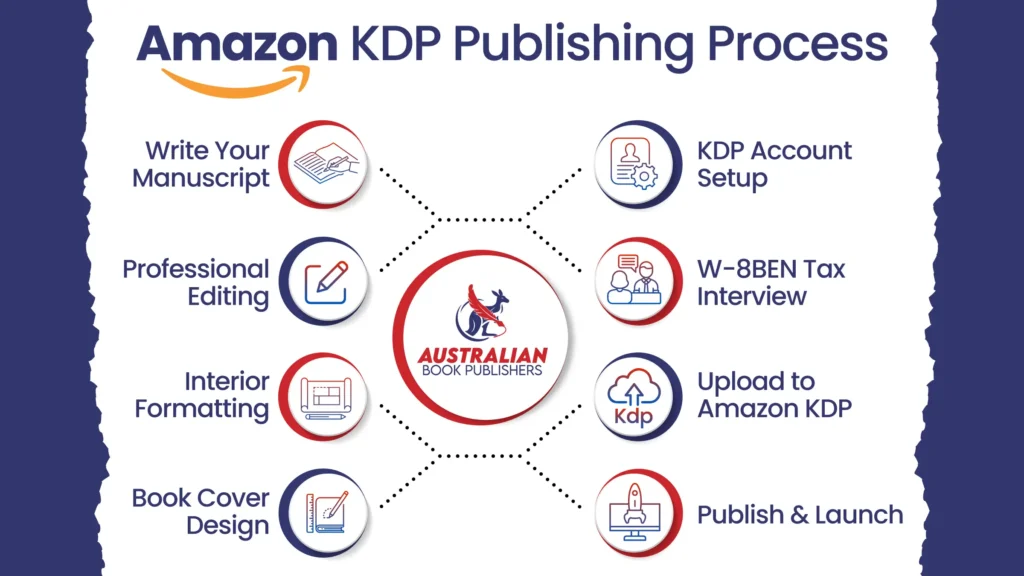
If you’ve made it this far, you’re ready to turn your finished manuscript into a published book. I’ll walk you through each stage of the process, explain the decisions that matter most and share the practical tips about how to publish a book on Amazon KDP and I give first-time authors to help them avoid common publishing mistakes.
Step 1: Set Up Your Amazon KDP Account
Start with your Kindle Direct Publishing (KDP) account. It’s free to create, takes only a few minutes and gives you access to Amazon’s entire self-publishing platform.
If you already have an Amazon shopping account, you can use the same login details for your Amazon KDP account setup. There’s no need to create another account.
Once you’ve signed in, Amazon will ask for some basic information before you can publish your first book. This includes your legal name, contact details, country of residence, bank account for royalty payments and tax information. If you’re publishing under your own imprint, you can also enter your publisher name.
I find this is the easiest part of the entire process. Most authors complete it in 10 to 15 minutes. Where people usually pause isn’t the account itself. It’s the tax interview, which is the next step of how to self-publish on Amazon KDP.
Step 2: Complete Your Tax Interview
If you’re an independent author, this is one step I don’t recommend rushing. Many international guides mention the tax interview briefly, but very few explain what it actually means for global self-published authors.
During your account setup, Amazon asks you to complete a W-8BEN tax form. Despite how official it sounds, you’re not becoming a US taxpayer. Amazon simply needs to know where you’re a tax resident so it can apply the correct tax treaty to your royalties.
If you’re an non-US resident with no US tax residency or business interests, you can usually complete the interview using your local tax identification number. In most cases, there’s no need to apply for a US ITIN.
This matters because, without the completed form, Amazon may withhold 30% of your US-source royalties. When you correctly complete the W-8BEN tax form and claim the applicable international tax treaty benefits, that withholding rate is generally reduced to 5%.
It’s one of the simplest forms you’ll complete, yet it’s also one of the most valuable. Over the lifetime of your book, that difference can add up to a significant amount of money.
Before submitting your details, I always recommend checking a few things.
- Your legal name matches your banking records.
- global markets is selected as your country of tax residence and your local tax rules.
- Your TFN has been entered correctly.
- our bank account can receive international royalty payments.
- Your treaty benefits have been claimed where you’re eligible.
Spending another five minutes here is far easier than trying to fix payment issues later.
Step 3: Prepare Your Manuscript
One thing I’ve learnt over the years is that uploading a manuscript isn’t the same as publishing a professional book.
Amazon doesn’t review your writing before it goes live. If your book contains grammar mistakes, inconsistent formatting or structural problems, it’ll still be published. Your readers, however, will notice those issues almost immediately.
That’s why I always encourage authors to slow down before they think about uploading anything.
Finish your manuscript first.
Then edit it.
Only after the editing is complete should you move into production.
I often see first-time authors formatting their books before they’ve finished revising them. Unfortunately, every change made afterwards means the formatting has to be adjusted again. It creates more work and often increases production costs.
The publishing workflow I recommend looks like this:
- Finish the manuscript.
- Complete developmental editing.
- Move to copy editing.
- Proofread the final version.
- Format the interior.
- Carry out one final quality check.
Following this order makes the entire publishing process smoother.
If you’re still unsure about your manuscript, I’d suggest investing in developmental editing and proofreading services before moving on. Fresh editorial feedback often identifies issues that are difficult to spot after reading your own work dozens of times.
Before you continue, make sure your manuscript also includes the front and back matter your readers expect, such as a copyright page, title page, table of contents, acknowledgements, author biography and references where required.
Step 4: Format Your Book for Kindle and Print
Once your manuscript is complete, the next job is preparing it for publication.
This is where many authors discover that writing and formatting are two completely different skills.
When people ask me how to format a book for Kindle, I explain that Kindle books and printed books use completely different layouts.
A Kindle edition uses responsive eBook formatting, meaning the text automatically adjusts to different screen sizes and devices.
A paperback or hardcover uses fixed pages, so every margin, page number, chapter heading and image must stay exactly where it’s placed.
For your Kindle edition, I recommend preparing an EPUB file with:
- A clickable table of contents
- Consistent heading styles
- Clean paragraph spacing
- Responsive chapter breaks
- Working hyperlinks
- Properly optimised images
For your paperback or hardcover, you’ll normally upload a print-ready PDF. You’ll also need to choose your trim size, bleed settings, paper type, interior ink and page dimensions before publishing.
Trying to convert a Word document directly into a print file often creates problems such as broken page numbers, blank pages, inconsistent spacing and rejected uploads.
If formatting isn’t your area of expertise, it’s usually more cost-effective to get your manuscript properly formatted than spend hours trying to troubleshoot technical issues yourself.
Don’t Let Formatting or Cover Design Hold Your Book Back
From EPUB conversion to print-ready covers, get your book professionally formatted and designed to convert Amazon browsers into buyers.
Get a Free Formatting & Cover QuoteStep 5: Design a Cover That Sells
I’ve seen excellent books struggle simply because their covers failed to make a strong first impression.
On Amazon, readers don’t see your book sitting on a shelf. They see a thumbnail.
That means your book cover design has only a few seconds to capture attention before someone scrolls to the next title.
I like using what many designers call the five-second rule.
If a reader can’t instantly recognise the genre, understand the tone and feel confident that the book looks professionally produced, the cover probably needs more work.
A strong cover doesn’t rely on complicated artwork. It relies on clear typography, visual hierarchy and imagery that matches reader expectations.
Remember that an eBook only requires a front cover.
A printed edition requires a front cover, spine and back cover, all designed to the correct dimensions based on your final page count.
Because the spine width changes as your manuscript changes, I always recommend designing your print cover after the interior layout has been finalised.
If design isn’t your specialty, investing in covers designed to convert Amazon browsers into buyers is one of the best decisions you can make.
Step 6: Set Your ISBN, Metadata and Pricing
With your files ready, it’s time to complete the information that helps readers discover your book.
Many people think metadata is just administrative information. I see it differently. It’s one of the biggest factors influencing how your book appears on Amazon.
Before publishing books on Amazon, you’ll need to complete your:
- Book title
- Subtitle
- Author name
- Book description
- Keywords
- Categories
- ISBN
If you’re planning to self publish on Amazon, the free ISBN supplied by KDP is usually enough if you’re only selling through the platform. However, if your goal is to publish a book on Amazon while also distributing through other retailers or building your own publishing imprint, purchasing your own ISBN gives you greater flexibility and keeps your publishing identity consistent.
I also encourage authors to spend time writing their book description. Don’t treat it like a summary. Treat it like a sales page. Your description should persuade readers to keep scrolling until they click Buy Now.
The same applies to keywords and categories. Choose phrases your readers are genuinely searching for instead of chasing broad categories with heavy competition.
Step 7: Understand Royalties, GST and Print-on-Demand
One of the biggest advantages of publishing with Amazon is the royalty model.
Eligible Kindle books can receive either 35% or 70% royalties, depending on the price, distribution settings and participating marketplaces.
Printed books work differently because Amazon deducts printing costs before calculating your earnings.
If you’re selling through the Amazon marketplace marketplace, you’ll also need to understand GST on Amazon book sales. GST forms part of the overall pricing calculation, so it’s worth factoring that into your pricing strategy before publishing.
Let’s look at a simple example.
If you price a paperback at USD $24.99, Amazon first deducts the printing cost, then calculates your royalty from the remaining amount. Longer books cost more to print, so they’ll naturally return a lower royalty than shorter books with the same list price.
Another point many authors overlook is that independent author royalties are generally paid in USD. Depending on your bank, exchange rates and currency conversion fees can affect the final amount that reaches your account.
Since 2021, KDP printing facilities worldwide have also improved delivery times for many local customers. Thanks to print-on-demand, books are printed only after they’re ordered, so there’s no need to invest in large print runs or store unsold copies.
If you’re planning book launches, festivals or retail distribution, it’s also worth comparing Amazon’s author copies with professional book printing services for larger orders.
Step 8: Publish and Promote Your Book
Once you’ve checked everything, it’s finally time to self publish on Amazon.
After uploading your files, Amazon usually reviews new books within 24 to 72 hours before they’re available for purchase.
Reaching this point is exciting, but I always remind authors that publishing is only the beginning.
Even the best Amazon self-published books need readers to discover them.
I recommend building interest before launch by sharing behind-the-scenes updates, revealing your cover, growing an email list and collecting advance reviews wherever possible. Having a clear launch strategy and marketing support in place before publication can make a significant difference to your book’s visibility during those critical first few weeks.
Once your book is live, Amazon Advertising can help place your title in front of readers already searching for similar books. Combined with a strong description, competitive pricing and positive reviews, it can be an effective way to build early momentum.
Beyond Amazon, think about creating your own branded author site, investing in video marketing for your book, and putting together a long-term promotional plan instead of relying on launch week alone.
If you’re still at the idea stage rather than the manuscript stage, it may be worth choosing to work with an experienced professional ghostwriter. If you’re publishing a picture book, our professional illustration team can help bring your story to life from concept to completion.
Finally, before you commit to any publishing path, take time to understand the cost to publish a book. A realistic budget helps you invest where it matters most and gives your book the strongest chance of long-term success.
Also Read: How to self-publish a book
Beyond Amazon: Build an Author Brand That Lasts
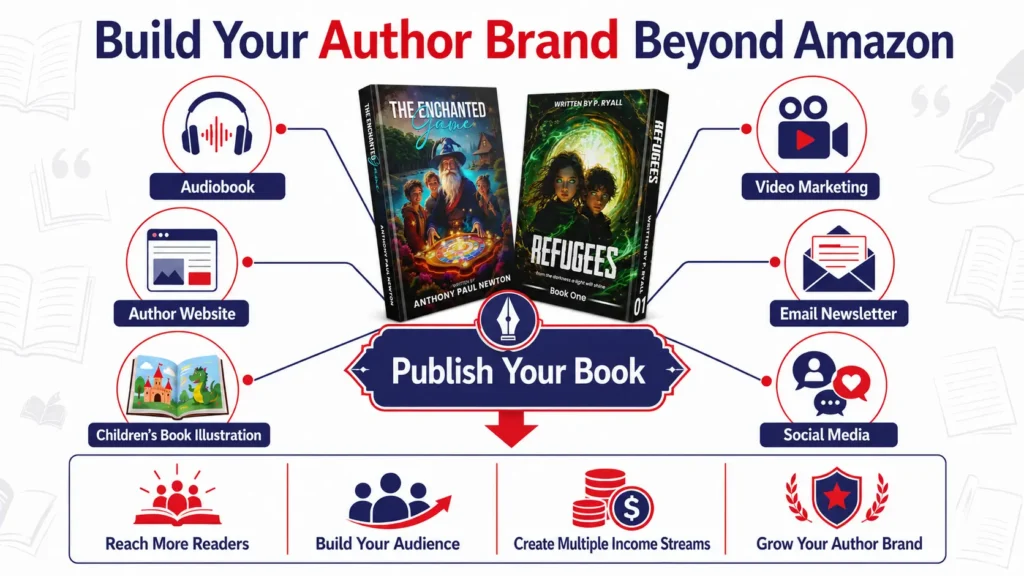
Publishing your first book is a huge achievement, but I always encourage authors to think beyond launch day. A successful publishing journey isn’t built around one title. It’s built around an author brand that readers recognise, trust and come back to with every new release.
Amazon is an excellent place to publish, but it shouldn’t be the only place readers discover you. As your audience grows, I recommend expanding your presence across different formats and platforms so you’re not relying on a single sales channel.
Turn Your Book into an Audiobook
Audiobooks have become one of the fastest-growing publishing formats, especially among commuters and busy professionals. If your book lends itself to audio, recording an audiobook is a great way to reach readers who prefer listening over reading while creating another income stream from the same manuscript.
Create Your Own Branded Author Site
One piece of advice I give every author is to build your own branded author site as early as possible. While Amazon controls your book listing, your website belongs to you.
It becomes the home for your books, author biography, media appearances, mailing list and future releases. It also gives readers a simple way to stay connected long after they’ve finished your book.
Bring Children’s Books to Life
If you’re publishing a children’s book, illustrations are just as important as the words on the page. The right artwork helps tell the story, captures a child’s imagination and creates a memorable reading experience.
Working with our professional illustration team ensures your illustrations suit your target age group while meeting the technical requirements for both digital and printed editions.
Connect Through Video
Readers enjoy getting to know the person behind the book. Simple author introductions, behind-the-scenes clips and book trailers can all help build trust before someone decides to buy.
That’s why many authors now include video marketing for your book as part of their overall promotional strategy, particularly when launching on social media.
DIY or Professional Publishing: Which Approach Is Right for You?
One of the reasons I like recommending Kindle Direct Publishing (KDP) is that anyone can publish a book. The platform is designed to be accessible, even if you’ve never published before.
What I’ve also learnt is that publishing well takes more than uploading a manuscript. Editing, formatting, cover design and marketing all require different skills, and learning each one takes time.
The areas where I see first-time authors needing the most support include:
- Structural editing
- Copy editing and proofreading
- Interior formatting
- Professional cover design
- Book metadata and keywords
- Marketing strategy
- Amazon Advertising
There’s no right or wrong approach. If you enjoy learning new skills and have the time to invest, publishing independently can be incredibly rewarding.
If you’d rather focus on writing while experienced professionals handle the technical side, working with book publishers worldwide can save time, reduce costly mistakes and help you publish to a much higher standard.
If you’re still at the idea stage, you may also prefer to work with an experienced professional ghostwriter who can help turn your concept into a professionally written manuscript.
What Does It Cost to Publish a Book on Amazon?
One of the questions I’m asked most often is about the cost to publish a book.
The good news is that Kindle Direct Publishing (KDP) doesn’t charge a fee to publish your book. Creating your account, uploading your files and listing your title on Amazon are all free.
Where authors usually invest is in producing a professional-quality book. Depending on your goals, you may choose to budget for editing, cover design, formatting, ISBNs, author copies or marketing.
| Publishing Service | Typical Cost (USD) | What’s Included |
| Kindle Direct Publishing (KDP) Account | Free | Create your KDP account and publish eBooks, paperbacks and hardcovers. |
| ISBN (Optional) | $44–$99 | Purchase your own ISBN to publish under your own imprint instead of using Amazon’s free ISBN. |
| Professional Editing | $800–$3,500+ | Developmental editing, copy editing or proofreading, depending on your manuscript and word count. |
| Book Cover Design | $300–$1,200 | Custom front cover for eBooks or a full wrap-around cover for print editions. |
| Interior Formatting | $200–$800 | Professional formatting for Kindle, paperback and hardcover editions. |
| Children’s Book Illustration | $1,500–$8,000+ | Custom illustrations based on the number of pages and artwork style. |
| Author Copies | $5–$15 per copy | Printing cost only. Shipping charges are additional and depend on quantity and location. |
| Amazon Advertising | From $5–$20 per day | Flexible advertising budget to promote your book on Amazon. |
| Author Website (Optional) | $500–$2,500+ | A professional website to showcase your books, grow your mailing list and build your author brand. |
Note: The figures above are approximate global market rates and should be used as a guide only. Your final cost to publish a book will vary depending on your manuscript’s length, the services you require and whether you choose the DIY route or work with publishing professionals. Many authors spread these costs across the publishing process rather than paying for everything at once.
Some authors complete every stage themselves, while others invest in professional publishing services from the beginning. In my experience, success isn’t determined by how much you spend. It’s determined by the quality of the finished book and how effectively you present it to readers.
Want a Clear, Fixed Cost for Your Book?
Editing, formatting, covers and marketing all add up differently for every manuscript. Get a personalised cost breakdown before you publish.
Get My Free Publishing QuoteTypical Publishing Timeline
Although it’s possible to upload a book to Amazon in a single afternoon, producing a book you’re genuinely proud of usually takes much longer.
A realistic publishing timeline often looks like this:
| Stage | Typical Time |
| Writing the manuscript | 2–12 months |
| Editing | 2–6 weeks |
| Proofreading | 1–2 weeks |
| Cover design | 2–3 weeks |
| Interior formatting | About 1 week |
| Amazon review | 24–72 hours |
| Launch preparation | 2–4 weeks |
I always recommend allowing extra time for revisions, proof copies and final checks. Publishing isn’t a race, and taking a little longer to get the details right usually leads to a far better book and a much smoother launch.
Amazon Publishing Checklist
Before submitting your book for review, work through this final checklist.
✓ Manuscript completed
✓ Developmental editing finished
✓ Proofreading completed
✓ Interior formatting approved
✓ Cover design finalised
✓ ISBN arranged (if required)
✓ Keywords and categories selected
✓ Book description written
✓ W-8BEN tax interview completed
✓ Pricing reviewed
✓ Proof copy checked
✓ Marketing plan prepared
If every box is ticked, you’re ready to publish with confidence.
Final Thoughts
Learning how to publish a book on Amazon is much easier when you understand the process from the beginning. While Kindle Direct Publishing (KDP) makes self-publishing accessible, creating a book that readers are excited to buy still takes careful planning. From editing and formatting to cover design, pricing and marketing, every decision plays a part in your book’s success.
I always encourage authors to focus on quality rather than speed. Taking the time to prepare your manuscript properly, choosing the right publishing options and planning your launch will give your book the strongest possible start. Whether you’re publishing your first title or adding another book to your catalogue, every release is an opportunity to grow your readership and build your author brand.
Ready to Publish Your Book with Confidence?
From manuscript to marketing, our team helps authors worldwide prepare, publish and promote books that are built to succeed on Amazon.
Book a Free Consultation